URL encoder
Encode any string input to URL format.
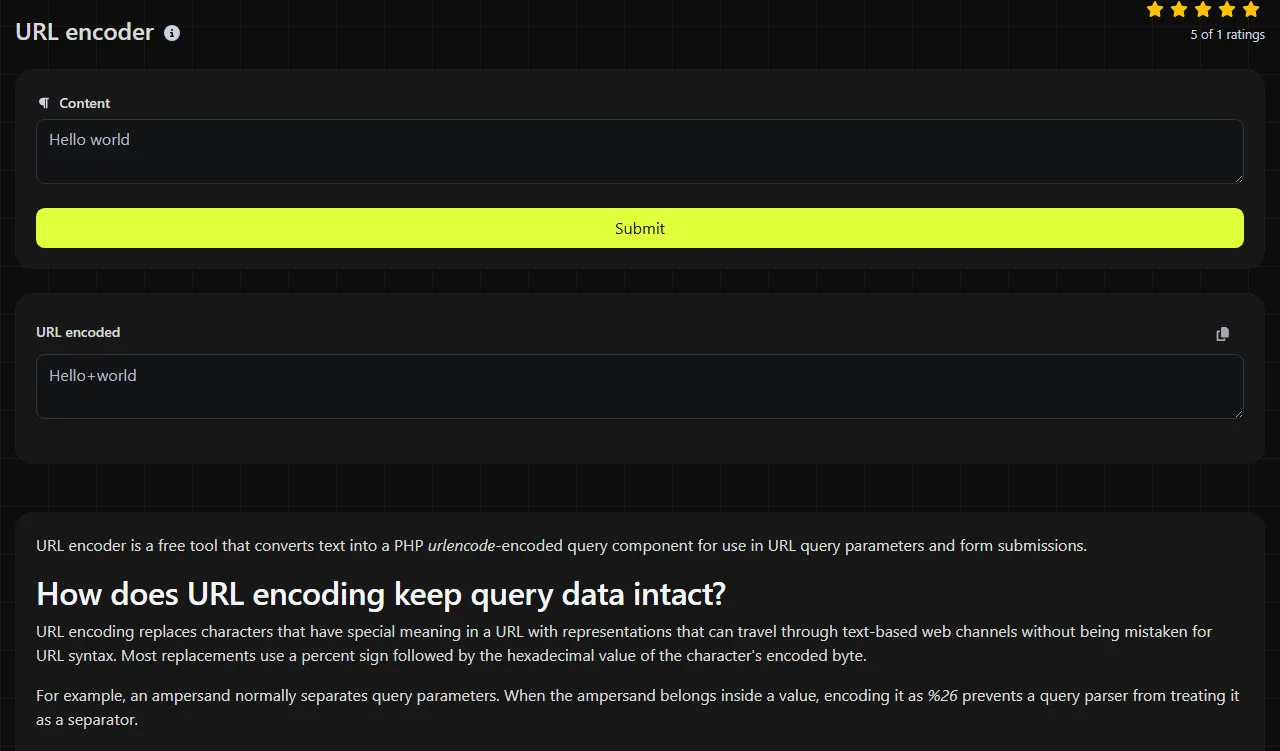
URL encoder is a free tool that converts text into a PHP urlencode-encoded query component for use in URL query parameters and form submissions.
How does URL encoding keep query data intact?
URL encoding replaces characters that have special meaning in a URL with representations that can travel through text-based web channels without being mistaken for URL syntax. Most replacements use a percent sign followed by the hexadecimal value of the character's encoded byte.
For example, an ampersand normally separates query parameters. When the ampersand belongs inside a value, encoding it as %26 prevents a query parser from treating it as a separator.
A small before-and-after example is:
Before red shoes & socks
After red+shoes+%26+socks
This tool uses PHP's urlencode operation. Under that format, spaces become plus signs. Letters, numbers, hyphens, underscores, and periods remain readable, while punctuation and non-ASCII bytes are percent-encoded.
URL encoding provides no secrecy. Anyone can decode the result, so passwords, session tokens, personal records, and other sensitive data should not be treated as protected merely because they contain percent escapes.
What output does this encoder produce?
The encoder returns one PHP urlencode-encoded query component in the URL encoded field. Enter the data that needs to become a query value, run the conversion, and copy the returned value into the appropriate URL component.
These examples show the operation's treatment of common input:
- summer sale becomes summer+sale.
- size=M/L becomes size%3DM%2FL.
- 100% becomes 100%25.
- José, represented as UTF-8, becomes Jos%C3%A9.
- 2026 remains 2026 because digits do not require escaping.
Percent encoding works on bytes. Accented letters and non-Latin characters usually become several percent escapes because their UTF-8 representations use multiple bytes. Punctuation may also expand from one character to three visible characters, such as ? becoming %3F.
Empty input produces no encoded content from PHP's urlencode operation. Very long input can produce a much longer result, and the receiving browser, server, proxy, or application may impose its own URL-length or request-size limits.
Choosing the correct component
Use this encoding primarily for individual query parameter names and values, especially when the receiving system expects HTML form-style encoding. Encoding an entire URL would also encode structural characters such as the colon, slashes, question mark, equals signs, and ampersands that tell software how the URL is organized.
For unencoded input such as https://example.com/search?q=red shoes, encode the value red shoes, then place red+shoes after q=. Keep the scheme, hostname, path separators, and query delimiters in their structural roles.
Path segments often follow different rules. In particular, a plus sign is commonly interpreted as a space by form-style parsers, but it may be a literal plus sign in a path. Code that constructs URLs should use a component-specific API rather than applying one encoding rule to every part.
Where does percent encoding appear in everyday web data?
Percent encoding commonly appears in query strings, links, and payloads that need to carry characters outside a component's permitted set. The surrounding format determines how the encoded data should be interpreted.
- Query strings encode search terms, filter values, return addresses, and tracking parameters.
- Data URLs may percent-encode textual content. Binary content is often represented with Base64 instead.
- Email links can contain encoded subject lines or body text inside a mailto URL.
- JSON payloads may contain an already encoded URL as a JSON value. JSON escaping and URL encoding are separate operations.
- Internationalized URLs may use percent encoding for UTF-8 path or query data. Internationalized hostnames use IDNA and Punycode rather than ordinary URL encoding.
When binary data must be embedded in text, Base64 may be more suitable than percent-encoding every byte. Image to Base64 handles that different representation, while URL decoder reverses percent-encoded query data.
What should you inspect when decoding returns an error or unreadable data?
Check the encoding family, character encoding, and number of encoding passes when a decoder fails on percent-encoded or form-style URL data or returns gibberish. A value that looks encoded may use a different alphabet or may represent binary data rather than readable text.
- Wrong format. Percent encoding uses sequences such as %2F. Standard Base64 uses letters, numbers, plus signs, slashes, and sometimes equals-sign padding. Base64URL uses a modified alphabet. Sending one format to another format's decoder will fail or produce unrelated bytes.
- Double encoding. An encoded percent sign becomes %25. For example, %26 encoded again becomes %2526, so one decoding pass returns %26 rather than an ampersand.
- Malformed escapes. A percent sign should be followed by two hexadecimal digits. Input such as %G1 is not a valid percent escape.
- Missing padding. Percent encoding has no padding. Missing equals signs are instead a possible Base64 issue, and some Base64 decoders are stricter than others.
- Binary or mismatched text encoding. Percent-decoding produces bytes before any character-encoding interpretation. Those bytes can still look unreadable if they contain an image, compressed data, or text encoded with a character set other than the one used to display it.
Frequently asked questions
Why did my literal plus sign turn into a space?
Form-style query decoders commonly treat a plus sign as a space. A literal plus sign should be encoded as %2B when it appears in a form-style query value.
Should I encode a URL before putting it in HTML?
URL encoding and HTML escaping solve different problems. Encode the relevant URL components first, then escape characters required by the HTML context, such as writing an ampersand as a character reference inside an attribute.
Does URL encoding normalize accented characters?
No. Visually identical Unicode text can have different underlying code point sequences, and URL encoding preserves those differing byte sequences. If an application requires normalized Unicode, normalization must happen before encoding.
Can I paste an access token into this tool?
The input travels to the server over HTTPS, the work is performed on the server, and the input is not stored. Even so, URL encoding does not hide a token, and placing credentials in a URL can expose them through browser history, logs, analytics, or referrer data. Use the service's documented authorization header or request-body method when available.
Why does an encoded slash behave differently in some systems?
Some web servers and frameworks decode %2F before routing, reject it, or preserve it based on configuration. If a value may contain slashes, keep it in a query parameter or use the receiving application's documented path-segment rules.
Similar tools
Popular tools
Create a WhatsApp chat link from a phone number, with an optional prefilled message.