UTM parameters are tags you add to the end of a URL so Google Analytics can tell which campaign sent a visitor. A UTM builder adds them for you. You paste your page URL, fill in a source such as instagram, a medium such as social and a campaign name, and copy the tagged link. When someone clicks it, Google Analytics 4 can show the visit under that campaign in its Traffic acquisition report, as long as GA4 is set up on the destination website. UTM tags don't track anything on their own.
This guide explains each parameter in plain English, shows a free UTM builder, and covers the naming habits that keep your reports clean. The parameter definitions are from Google's Analytics Help Center, checked October 18, 2026.
What are UTM parameters?
Google's Analytics Help lists these parameters you can add to a destination URL.
| Parameter | What it identifies | Example |
|---|---|---|
| utm_source | The referrer, where the click came from | instagram, newsletter |
| utm_medium | The marketing medium | social, email, cpc |
| utm_campaign | The product, promotion or campaign | holiday_sale |
| utm_content | Which creative or link, when you have several | bio_link, story_02 |
| utm_term | The paid keyword | soy candles |
| utm_id | A campaign ID | fall26 |
Definitions from Google Analytics Help, Collect campaign data with custom URLs. Google uses utm_content as its example of telling two call-to-action links in the same email apart. Google's page lists a few more, such as utm_source_platform, utm_creative_format and utm_marketing_tactic, and notes that the last two aren't currently reported in Google Analytics.
How to use a free UTM builder
BioLink.page has a free UTM link generator that works without an account. Paste the URL of the page you're promoting, then fill in source, medium and campaign, and content if you're testing more than one link. The tagged URL appears once you've filled in the fields.
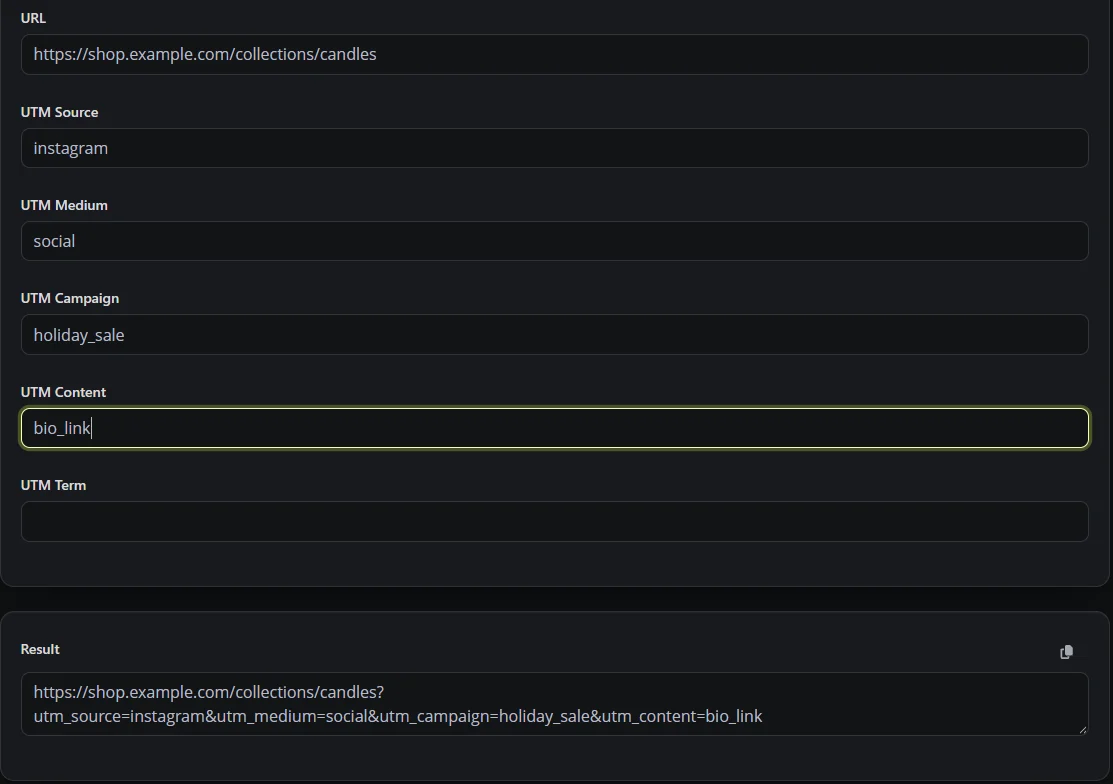
Google also offers its own Campaign URL Builder, linked from the same help page. Both produce the same kind of tagged link, which you can then shorten and manage.
Why put UTM links behind a short link?
A tagged URL is long and hard to share, which is fine in an ad but awkward in a bio, a text message or on a flyer. A short link hides the tags. On BioLink.page, each short link has a UTM Parameters section in its settings, so the short link stays readable and the tags are added to the destination when someone clicks. UTM tags are on the free plan, along with 100 short links and 30 days of statistics.
You can then compare short link clicks with GA4 campaign data. In GA4, go to Reports, then Acquisition, then Traffic acquisition, and change the main dimension to Session campaign or Session source / medium. The numbers won't match exactly, because some visitors block analytics and a click doesn't always load the page fully. GA4 reports can also take 24 to 48 hours to finish processing.
UTM naming habits that keep reports clean
- Pick lowercase and stick to it. GA4 can treat Instagram and instagram as different values, which splits your numbers.
- Use consistent medium values such as social, email and cpc. GA4 looks at source, medium and other campaign details to assign default channel groups, so instagram with social usually lands in Organic Social while instagram with cpc can land in Paid Social.
- Name campaigns so you'll understand them in six months. holiday_sale_2026 is easier to recognize than promo1.
- Use utm_content to tell links apart within one campaign, for example bio_link versus story_link.
- Keep a simple shared sheet of the names you use, so everyone on the team tags the same way.
- Don't tag links between pages of your own website. UTM tags are meant for campaigns, and on internal links they complicate attribution.
- Never put personal information, such as a customer's name, email or phone number, in UTM values. Google asks that you don't send that kind of data to Analytics.
- If you run Google Ads, check auto-tagging before adding UTM tags by hand. Google recommends auto-tagging for Ads campaigns.
Where to use UTM links
Use them anywhere you share a link outside your own site. That includes your Instagram bio, your TikTok profile once it's eligible for a website link, story link stickers, emails and newsletters, QR codes on print, posts in Facebook groups and partner websites. For print, put the tags behind a short link or a dynamic QR code, so the code stays simple and you can fix a typo later. Our guide to branded short links for small businesses covers the domain side.
Frequently asked questions
Do UTM parameters affect SEO?
They don't automatically hurt rankings, but each tagged link is another URL for the same page that search engines may find. Google picks a canonical version, so make sure your pages declare one, and keep tracking parameters out of your own site's navigation.
Where do I see UTM data in GA4?
Go to Reports, then Acquisition, then Traffic acquisition, and switch the main dimension to Session campaign or Session source / medium.
Which UTM parameters are required?
Google recommends using utm_source, utm_medium and utm_campaign together. Content, term and utm_id add detail when you need it. Leaving out the main three can leave gaps such as (not set) in your reports.
Is the BioLink.page UTM builder free?
Yes. The UTM link generator is free to use without an account. UTM tags on short links are on the free plan.
Can I add UTM tags to a QR code?
Yes. Tag the destination URL, then make the QR code from a short link or a dynamic QR code, so the printed code stays short and you can change the destination later. A QR code that holds the full tagged URL directly can't be changed after printing.
Why don't my link clicks match GA4 sessions?
They measure different things. A click is counted when the short link opens, while a GA4 session needs the page to load with Analytics allowed to run.
Want short, tagged links for your next campaign? Sign up for a free BioLink.page account.